

GOOGLE EXPRESS (Redesign)
Enhancing the overall app experience by introducing a streamlined aesthetic and improving package delivery efficiency
The Problem: The current Google Express driver app lacks modern design, efficient task management, and intuitive navigation, making it hard for drivers to work effectively. A redesigned app is needed to improve usability, streamline tasks, and help drivers deliver better service with ease.
MOBILE APP
UX/UI DESIGN
PROTOTYPING
COURIER & PARCEL DELIVERY
USER RESEARCH
PRODUCT DESIGN
BRANDING
REDESIGN
INTERACTION DESIGN
USABILITY TESTING


OVERVIEW
Goals
-
Navigation, optimizing task management, and improving overall usability
-
Enabling drivers to deliver exceptional service and enhance their day-to-day operations.
-
Following Google's design language (Material Design)
-
Adding new typography and elements and features
Pain Points
-
Insufficient visual UI elements hinder drivers' ability to navigate the app effectively.
-
Drivers lack visibility into their route progress, making it challenging to stay on track.
-
Package icons in the app do not accurately represent the actual packages, causing confusion.
-
The app does not provide timely notifications for upcoming stops, impacting route efficiency.
-
Drivers face difficulties aligning totes with Container ID numbers due to unclear loading instructions in the current app.
My Role
-
Project Duration: 6 Months
-
Design Process: Interviews, User Research, UI Interface, Usability tests Brainstorming, User Flow, Low-Hi Fidelity Wireframes, Prototyping
-
Digital Tools: Figma, Adobe Illustrator, InDesign, Photoshop, LS Graphics
Solution
-
Package Totes and Icon Details
-
Enhance the clarity and organization of package totes through improved labeling (e.g., color codes or numeric identifiers).
-
Refine iconography to visually represent package details like size, weight, and fragility, making them easily identifiable at a glance.
-
Include real-time status updates on tote handling to streamline the workflow.
-
Better Delivery Descriptions and Customer Notes
-
Provide comprehensive delivery descriptions, including detailed drop-off instructions and specific customer preferences.
-
Highlight critical customer notes (e.g., gate codes, delivery time preferences) prominently in the app for quick reference.

RESEARCH
After interviewing the delivery employees. I ask a few questions about the Google Express App and what they would they like to see differently.
20
The total amount of drivers who participated in this survey

USER PERSONAS
90%
Dislike visual detail and information of the current app
95%
Drivers want a better courier app that will help them deliver packages efficiently
Focused on understanding the needs and frustrations of a younger demographic to better address their expectations and pain points.


USER INTERVIEWS
Interviewed 20 delivery drivers using open-ended questions to understand their needs and expectations. Subsequently, conducted user testing on the existing app to uncover usability issues and collect feedback on its content and features.


BRAINSTORMING
Exploring creative ideas to solve the identified pain points, improve workflows, and introduce features that add value.


USER FLOWS
Test with real drivers to gather feedback on ease of use and intuitiveness.


WIREFRAMES
Existing app and redesigned UI layout.


STYLE GUIDES
The app will follow Google’s Material Design Language, ensuring a modern, cohesive, and intuitive user experience.


PROTOTYPING & USABILITY TESTS
Prototype in Figma and conducted usability tests with delivery drivers for the Google Express app. During testing, I guided users through the profile page at the yard, where they check in on-site and complete the pre-check process before starting deliveries.


GOOGLE EXPRESS APP
The final app was redesigned and featured for the delivery drivers for additional feedback and testing


Morning Routine:
The morning routine begins with logging into the app, which provides a weather update for the day. Next, users are prompted to upload any required updated documents. They then select their vehicle and complete a full inspection. Once these steps are finished, the app directs them to drive to the yard to begin loading packages into their delivery vans.


When drivers log in, the current weather conditions will be displayed to assist them.
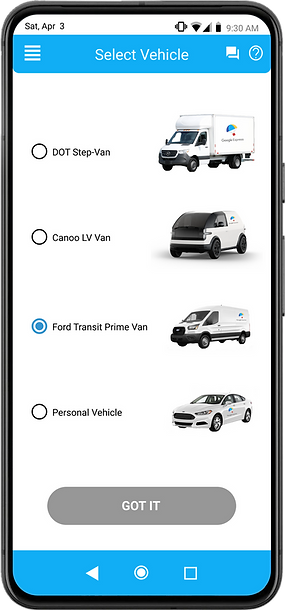
After logging in, drivers are prompted to select their preferred vehicle from the yard.

A vehicle inspection is mandatory before taking the delivery vehicle off the lot.


Loading Packages:
After logging into their profile, the driver reviews their menu for updates. Upon exiting the menu, the driver is presented with a screen displaying all packages in full color. As each package is scanned, it highlights with a green checkmark, indicating it’s ready for delivery. Once all packages are scanned, the driver can proceed with their route.


The homepage now features a bolder, more striking design.

Once parked and ready to scan, the new UI layout provides a detailed view of totes and packages.

Drivers can now determine what totes and packages they scanned and also can click on icon to see more details about the package


First Delivery Stop:
Once all the packages are scanned, the driver is ready to start deliveries. Guided by the GPS route, they head to their first stop, equipped with detailed information about the location and the packages to be delivered.


At the start of the route, the orange bar always displays the number of stops remaining.

Users can browse through their coworkers' profiles to view schedules, make calls, send messages, and request assistance.

New detailed package icons help drivers quickly identify packages, making them easier to locate.


Delivery Status:
Packages are placed on the front doorstep, and a photo is taken to confirm delivery and notify the customer. Additionally, drivers can now track their progress at each stop. Once all deliveries are complete, they are notified and can contact dispatch to report completion.

The placement of the camera icon allows to see more of the picture taking and move the flash icon closer

Drivers can now view their progress reports independently, eliminating the need to rely on Dispatch for hourly updates.

After completing their deliveries, drivers can now call dispatch or message other drivers for assistance directly within the app, without needing to exit. If no assistance is needed the driver can come back at the station.


Outcome
Impact:
User-friendly experience, enabling efficient task management, reducing operational friction, and enhancing overall productivity. This improvement will empower drivers to deliver faster, more reliable service, resulting in higher satisfaction for both drivers and customers.
Takeaways:
The updated Google Express app features a more visual and user-friendly interface, making it easier for delivery drivers to navigate. This improved design enhances efficiency by providing clear progress tracking and facilitating better communication among drivers when they need assistance.